 By Keshav Rai · Updated 12 October 2026
On this page
Choose your province from the official DoTM eDLVRS portal directory, then open the renewal service. The walkthrough below follows the Koshi screens.
How to Renew Driving License Online in Nepal
The steps below follow the Koshi Province eDLVRS renewal process. Other provincial portals may have different screens or requirements. Use the province that holds your driving license record.
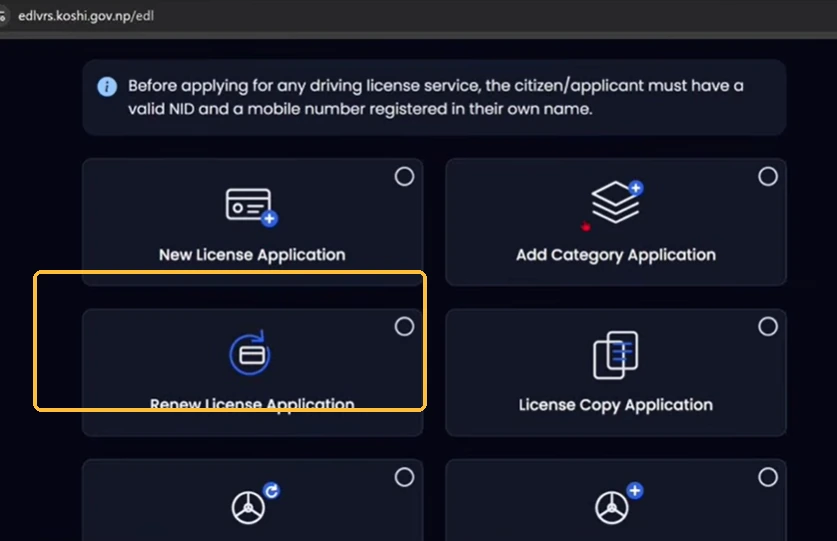
1Open the portal and select Renew License Application
Open your province's eDLVRS portal and choose Renew License Application. Do not choose New License Application or License Copy Application unless that is the service you need.
2Check the six renewal stages
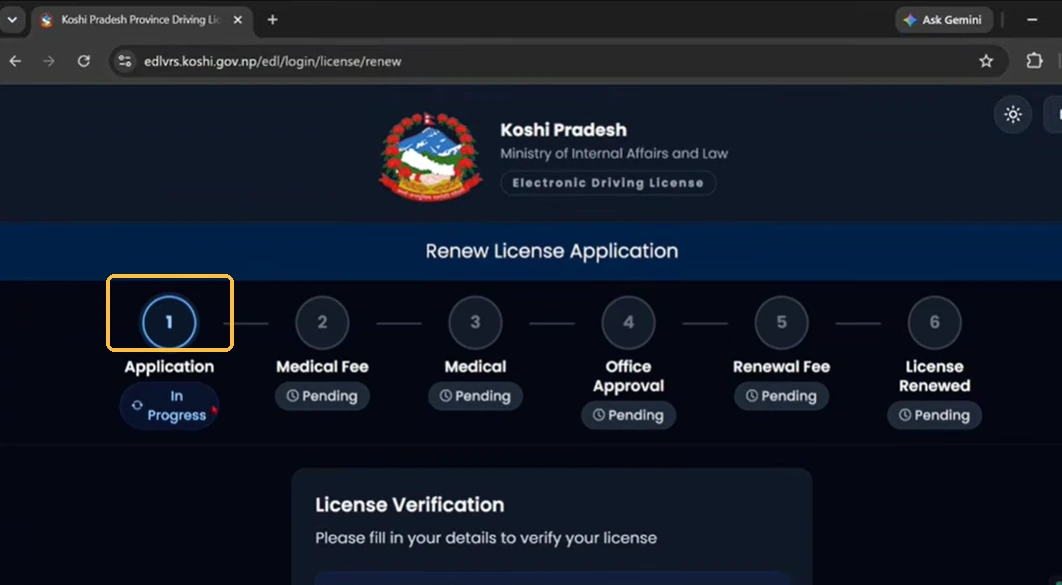
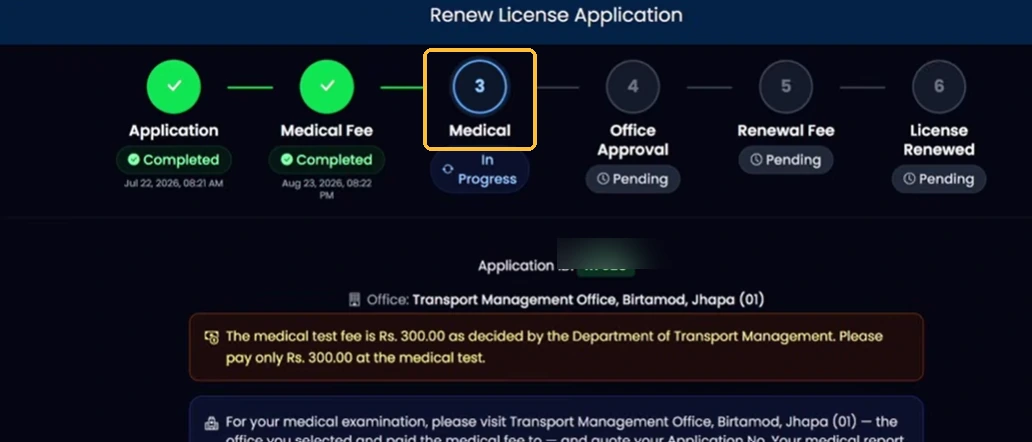
The portal displays six stages. Your application starts as In Progress, while medical payment, medical, office approval, renewal payment and final renewal show as pending.
3Enter your license number and National ID
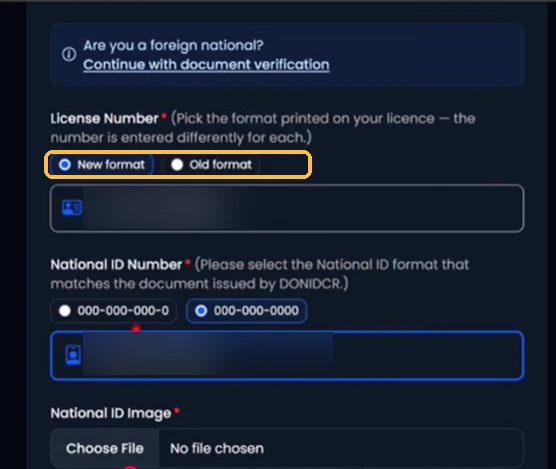
Select the old or new license number format printed on your card. Enter your license number without changing its dash pattern. Then select the NID format that matches your National ID record, enter the NID number, and upload the requested image.
4Enter your date of birth, email and OTP
Enter your date of birth as requested, provide your email address and click Continue. The portal says an OTP is sent to the mobile number linked to the license and to the email address. It also displays a limit of three applications per day for the license number. Complete OTP verification, review the details and proceed.

5Save the Application ID and generate a medical voucher
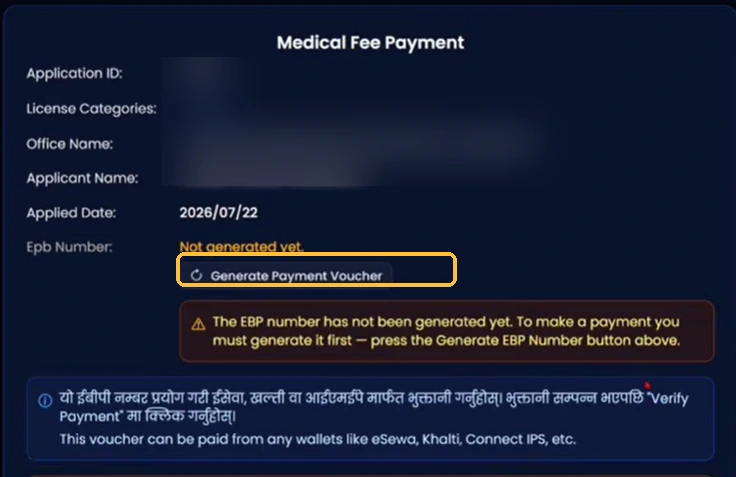
Once the application is accepted, save your Application ID. On the Medical Fee Payment screen, select Generate Payment Voucher to create the payment reference. If the EBP number is not ready, keep the Application ID and check again later instead of submitting a duplicate application.
6Check the medical fee and voucher deadline
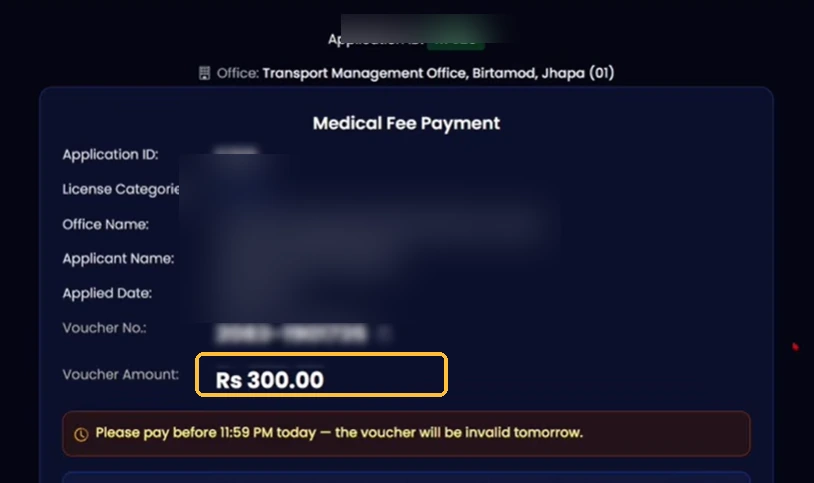
In the Koshi example, the generated voucher shows a NPR 300 medical fee. The screen also warns that the voucher must be paid before 11:59 PM that day. Check the amount and expiry displayed on your own voucher.
7Pay the medical fee online
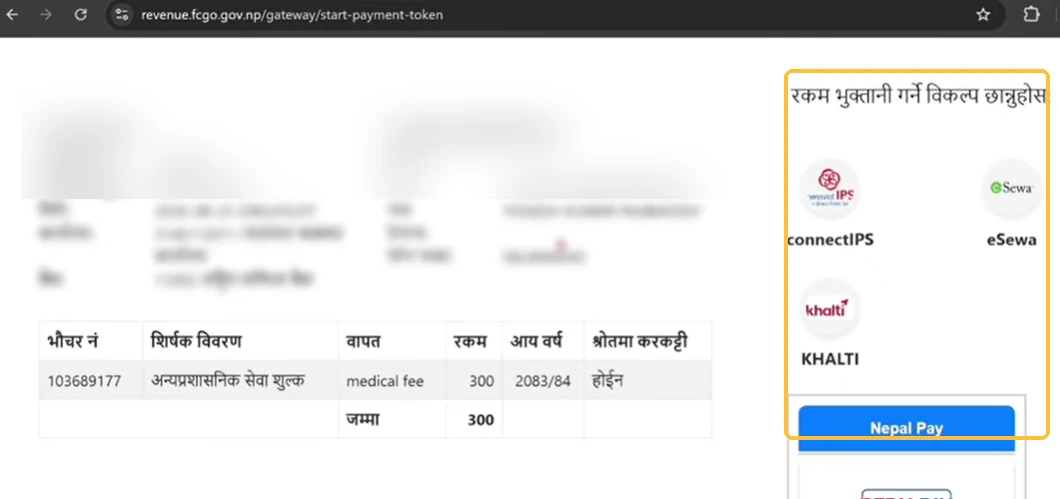
Choose one of the payment methods offered on the payment page. The example shows connectIPS, eSewa, Khalti and Nepal Pay. Complete the payment and save the receipt. If payment is not immediately reflected in eDLVRS, wait and use the Verify Payment option rather than paying twice.
8Visit the office for medical verification
Once the medical fee is confirmed, the tracker shows Medical — In Progress. Visit the Transport Management Office selected in your application. The office may issue a token for a same-day or later medical examination. Complete the required checks and wait for the office to update your medical status.
9Wait for office approval
After the medical examination, the application moves to Office Approval. The office checks your record and medical result. Once approved, the next payment stage becomes available. If approval stays pending, ask the selected office to check your Application ID.
10Pay the renewal fee and confirm the result
Open Renewal Fee after office approval. Check the amount shown for your category and expiry status, pay through the supported channel, and save the receipt. Return to the tracker to confirm that the final stage says License Renewed. This confirms renewal in the system; it does not necessarily mean the physical smart card has been printed.
Driving License Renewal Fees in Nepal (2026)
The Koshi payment screen shows a NPR 300 medical fee. The actual renewal fee is calculated later, after office approval, and may depend on province, vehicle category and expiry status. Check the current amount on your provincial portal before paying.
| Payment | When to pay | Amount |
|---|---|---|
| Medical fee | After application submission | NPR 300 in the Koshi example |
| Payment service charge | At checkout, if applicable | Shown by the payment provider |
| License renewal fee | After office approval | Shown by your provincial portal |
| Late penalty, if applicable | As calculated for an expired license | Depends on applicable rules |
Documents Needed for Driving License Renewal
Prepare the following before starting. Your portal or transport office may ask for additional documents.
- Original driving license and a readable copy.
- National ID number and the NID image requested by the portal.
- Citizenship certificate or National ID card for office verification.
- Date of birth and email address.
- Access to the mobile number linked to the license.
- Saved Application ID and payment receipts.
- Passport photographs or medical documents if your office requests them.
Can You Renew an Expired Driving License?
An expired license may still be eligible for renewal, but the fee and penalties depend on the applicable law and how long it has been expired. The official Nepal Police guidance describes a 90-day renewal window after expiry, followed by additional charges of 100%, 200%, 300%, 400% and 500% across successive late-renewal bands, and cancellation if renewal is not completed within five years. This is published guidance; confirm the current rule and calculation with your provincial office.
For an expired license, check the amount and eligibility shown in the provincial renewal system or ask the transport office before making a payment. Do not assume that an administrative grace period allows you to drive after the card's expiry date.
How long is a renewed license valid?
The official Nepal Police license guidance describes five-year validity. Do not assume a universal ten-year term. Check the expiry date issued on your renewed record and any current provincial notice.
How to Check Your Renewal Application Status
- Return to the same provincial eDLVRS portal.
- Open the application tracking or renewal section.
- Enter your saved Application ID or the details requested.
- Look for the current stage and any pending action.
Check whether your application, medical fee, medical examination, office approval and renewal payment are complete. The final stage should show License Renewed. Completed stages have a green check mark.
Common Renewal Problems and Solutions
NID or license number does not match
Check the old/new license number format, NID dash pattern and date of birth. Compare your NID with the Nagarik App record. If the information still does not match, ask the transport office to check the stored record.
OTP not received
Check the phone number linked to your license and the email address you entered. If you no longer have access to the registered number, ask the office how to update it.
EBP voucher number not generated
Keep your Application ID and check the payment screen again later. The supplied example shows a delay in voucher generation, but no fixed waiting time is guaranteed.
Payment completed but status remains pending
Keep the transaction receipt. Wait for payment confirmation and use Verify Payment when available. Do not make another payment until you have checked the first transaction.
Medical still says In Progress
Paying the medical fee does not complete the examination. Attend the office, complete the medical test and wait for the status to be updated.
Office approval is pending
Contact the selected transport office with your Application ID after the medical stage is complete.
After Your License Is Renewed
Renewal approval and physical card printing are separate. If you need to check available printed records, use our driving license print checker. A missing record does not establish that renewal failed.
Frequently Asked Questions
Can I renew my driving license completely online in Nepal?
You can complete the application and supported payments online, but the demonstrated process still requires an in-person medical examination at the selected transport office.
What is the medical fee for renewal?
The Koshi Province example shows NPR 300. Check the amount on your own voucher before paying.
Is the medical fee the same as the renewal fee?
No. The medical fee is paid earlier. The renewal fee becomes payable after the medical stage and office approval.
What if my NID details do not match?
Check the NID number and dash format against your Nagarik App record. If it still fails, contact the transport office.
How do I track my application?
Use the application tracking section of the same provincial eDLVRS portal and check the six-stage progress display.
Does License Renewed mean my smart card is printed?
No. It confirms the renewal process in the system. Physical card printing may happen later.
This website is not affiliated with DoTM. The renewal screens shown are from Koshi Province; other provinces may have different requirements.